Family
Family Expense Tracking in Telegram: The 2026 Setup That Actually Sticks
Read in other languages: Русский·Українська·Беларуская·हिन्दी·Español·Bahasa Indonesia·简体中文·Bahasa Melayu·தமிழ்

The family expense tracking setup that actually sticks in 2026 is the one living inside your family's Telegram chat: add SplitFast, log shared expenses (or scan receipts) as they happen, split them 50/50 or proportionally, and settle once a month with one netted transfer. No shared spreadsheet that dies by February, no budgeting app one partner silently stops opening.
Why family budget apps fail (and chats don't)
Most family budgeting attempts die the same death: the enthusiastic partner sets up an app, the other partner forgets it exists, and by week three the data is fiction. The root cause is a tool outside daily life.
Your family group chat is the opposite — it is opened dozens of times a day anyway. Putting the money tracking there means zero new habits: pay for groceries, log five seconds later, back to discussing dinner.
One Telegram group + @SplitFastBot. Whoever pays, logs. Splits match your family's agreement (50/50 or proportional). Receipts get scanned, not typed. Once a month: one transfer, balances zero, nobody has argued.
Setting it up
Add the bot to your family chat
Takes 10 seconds — full guide here. Both partners (and adult kids, grandparents, whoever shares costs) are picked up automatically.
Set your default split once — in group settings
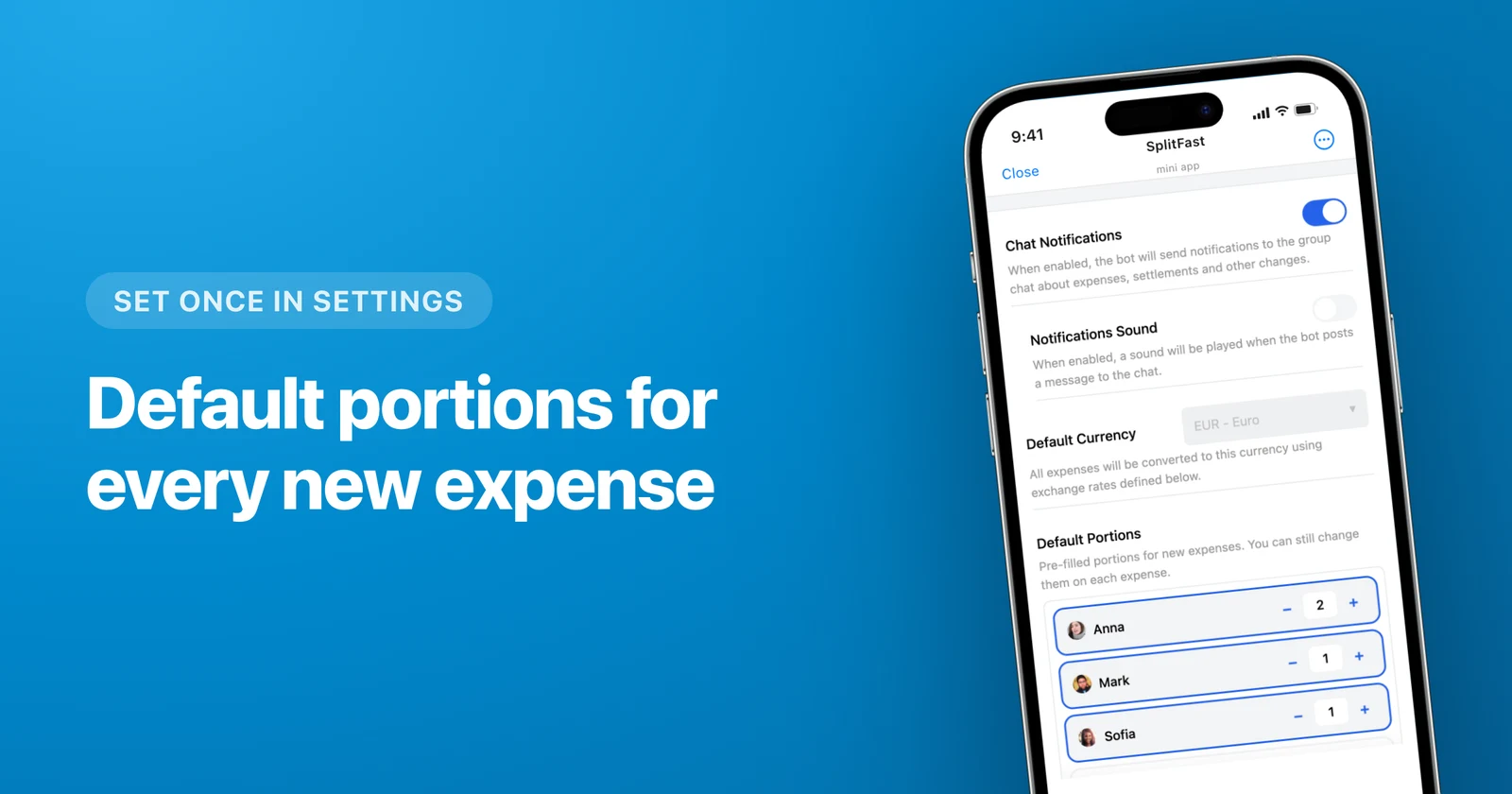
50/50 is the classic; income-proportional portions like 3:2 are increasingly common. In SplitFast you set this once: open Settings → Default Portions and give each member their share with the +/− stepper (everyone starts at 1; set 0 to leave someone out of new expenses by default). From then on, every new expense opens pre-filled with your family's ratio — and any single expense can still be adjusted on the spot.
Make logging effortless
Small expenses: type amount + word. Big grocery hauls: scan the receipt (Premium) and AI itemizes it — useful when some items are personal, not shared.

Settle monthly, not constantly
Real-time balance is visible all month, but money moves once: a single netted transfer on payday. Fewer transactions, zero nagging — the app remembers so nobody has to.
What families actually track
| Category | Typical split | Tip |
|---|---|---|
| Groceries & household | Default split | Scan receipts; separate personal items by lines |
| Rent / mortgage & utilities | Proportional portions | Log once a month, same day |
| Kids (classes, clothes, school) | 50/50 or proportional | A description like "Mia - swimming" keeps history searchable |
| Eating out & fun | 50/50 | Or by items when one partner's sushi habit escalates |
| Family trips | Same group, more currencies | See the multi-currency guide |
The psychology bit nobody says out loud
Money friction in couples is rarely about amounts — it is about visibility. When one partner pays "invisibly" (utilities auto-charge to their card) and the other pays visibly (groceries, restaurants), both honestly feel they pay more. A shared ledger fixes the feeling with data: everything visible, everything counted, fairness verifiable in two taps.
That is why the tracker must be frictionless enough to capture everything. A tool that misses half the expenses is worse than no tool — it makes the visible half look unfair. Chat-native logging is the only version families sustain long-term.
Start tonight
Add @SplitFastBot to the family chat, log today's groceries, and let the first month run. The setup costs one minute; the annual argument it prevents used to cost a weekend.
Frequently asked questions
What is the best Telegram bot for family expense tracking in 2026?
SplitFast (@SplitFastBot) is built for exactly this: it lives in your family group chat, adds members automatically, scans grocery receipts with AI (a Premium feature — one premium member unlocks it for the whole family group), supports uneven splits like income-proportional 2:1, and nets everything into one monthly settle-up. Core features are free.
How should couples split expenses — 50/50 or by income?
Both are legitimate; what matters is agreeing explicitly. 50/50 is simplest, income-proportional (portions like 3:2) feels fairer with different salaries. SplitFast supports either per expense — and you can save your ratio once as Default Portions in group settings, so every new expense starts pre-filled with it.
Can we track spending categories for the family budget?
Every expense has a description, and the shared history gives an honest picture of where money goes — groceries vs eating out vs kids. For deep analytics you may add a dedicated budgeting app; for "who paid and who owes", the chat-based tracker wins on consistency.
Does this work for extended family — parents, siblings, shared gifts?
Very well. A "Gift for mom" group with siblings, a dacha-renovation group with parents — each Telegram group gets its own balances, and settle-up stays inside that circle.